
Skin Colors
From Growtopia Wiki
More actions
Skin Colors are an option a player can use trough the Settings, here are a list of the available Skin Colors and how to obtain them.
Default skin colors
- All Growtopians can choose from eight shades of skin colors by default, ranging from dark brown to white.
| Color tone | HEX code |
|---|---|

|
#785C50 |

|
#967264 |

|
#B48A78 |

|
#C39582 |

|
#E1AC96 |

|
#FFC3AA |

|
#FFCEB4 |

|
#FFE5C8 |
Supporter skin colors
- Supporters have access to the following additional skin colors: red, purple, dark green, light green, aqua, and Mannequin white.
| Color tone | HEX code |
|---|---|

|
#B1DDA3 |

|
#41C2C5 |

|
#D74B2B |

|
#418A2A |

|
#A951D5 |

|
#F0F0F0 |
Super Supporter skin colors
- Super Supporters possess all previous skin colors as well blue, light blue, light orange and translucent red.
| Color tone | HEX code |
|---|---|
|
|
#3D7AD3 |
|
|
#B1CBEF |
|
|
#FF940B |
|
|
#E94756 |
Suscriber skin colors
- Subscribers have access to the dark purple and turquoise.
Skin colors under special conditions
- Skin colors that appear under certain conditions, such as from consuming a Blueberry or from Respawning.
| Color tone | HEX code | Description |
|---|---|---|

|
#C8F0DC | Appears during the Respawning animation. |

|
#72E7C4 | Appears when the Slimed! mod effect is active by touching a Ghost. |
Trivia
One can become a Supporter if they meet at least one of the following criteria:
- The player has earned 20,000 Gems through Tapjoy offers.
- The player has made at least 1 In-App Purchase.
One can become a Super Supporter if they meet at least one of the following criteria:
- The player has earned 600,000 Gems through TapJoy offers.
- The player has spent a total of 30 USD worth of In-App Purchases.
One can become a Subscriber by consuming a Royal Grow Pass Token or a 1-Year Subscription Token.
Gallery
-
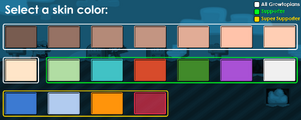 Helpful visual of all skin colors in Growtopia.
 -
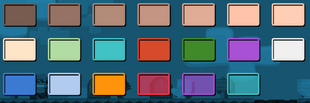 Updated list of all skin colors.

