Gateway To Adventure: Difference between revisions
More actions
Bambam Bot (talk | contribs) m Removing Category Items (automatic) |
Bambam Bot (talk | contribs) m →top: moving template, replaced: {{Item| → {{ItemOld| |
||
| Line 1: | Line 1: | ||
__NOTOC__{{ | __NOTOC__{{ItemOld|Gateway To Adventure|2|3 = You can set this door up like a Choose Your Own Adventure story! Type up to 5 lines of story, and then add up to 5 buttons for players to choose from, with Door IDs that they lead to.}} | ||
{{RecipeSplice|Aqua Wallpaper|Ancient Stone Gate}}The [[Gateway To Adventure]] is a door that allows players to choose multiple destinations, or to let through players who have the required [[Adventure Item (disambiguation)|adventure item]] to pass through. Four come with the purchase of the [[Adventure Pack]] for 20,000 Gems. | {{RecipeSplice|Aqua Wallpaper|Ancient Stone Gate}}The [[Gateway To Adventure]] is a door that allows players to choose multiple destinations, or to let through players who have the required [[Adventure Item (disambiguation)|adventure item]] to pass through. Four come with the purchase of the [[Adventure Pack]] for 20,000 Gems. | ||
Revision as of 01:43, 30 March 2019
| https://growtopiawiki.nbg1.your-objectstorage.com/uploads/e/e5/TreeSprites.png Splicing |
|---|
| The tree of this item can be made by mixing the following seeds: |
| https://growtopiawiki.nbg1.your-objectstorage.com/uploads/9/9c/SeedSprites.png Aqua Wallpaper Seed https://growtopiawiki.nbg1.your-objectstorage.com/uploads/9/9c/SeedSprites.png Ancient Stone Gate Seed |
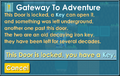
The Gateway To Adventure is a door that allows players to choose multiple destinations, or to let through players who have the required adventure item to pass through. Four come with the purchase of the Adventure Pack for 20,000 Gems.
The Gateway to Adventure can be wrenched to be edited. The player is allowed to write a paragraph which will be located at the top of menu when the player tries to use the door. Special "selectors" need to be used before text for each of the options and the destination must be specified (similar to a door).
Selector type
The selector always start with a symbol to specify the action.
- + - Show button or text ONLY if the player has a certain item.
- - - Show button or text ONLY if the player doesn't have a certain item.
- # - Show button ONLY if the player has a certain item, and if the player goes through the door, the item is consumed.
Adventure Item Code
The selector need to start with code to specify the item that is required:
Example
Show text only when the player has an Adventure Item - Banana:
- +BYou have a nice banana!
Show text when the player doesn't have an Adventure Item - Key:
- -KYou need a key to enter!
Show button that will use up an Adventure Item - Golden Idol when the player goes through the door
- #IPlace the Idol down!
Gallery
-
 A working Gateway To Adventure.