Door: Difference between revisions
From Growtopia Wiki
More actions
ExplodingLab (talk | contribs) No edit summary |
mNo edit summary |
||
| Line 1: | Line 1: | ||
{{Item|These magical doors connect all the worlds in Growtopia. Place one and then use your Wrench on it to set the destination.|Earth}} | {{Item|These magical doors connect all the worlds in Growtopia. Place one and then use your Wrench on it to set the destination.|Earth}} | ||
{{RecipeStore|Door & Sign Hello Pack|15||Own your very own Door and Sign! This pack comes with one of each. Leave cryptic messages and create a door that can open to, well, anywhere.}} | {{RecipeStore|[[Door & Sign Hello Pack]]|15|G|Own your very own [[Door]] and [[Sign]]! This pack comes with one of each. Leave cryptic messages and create a door that can open to, well, anywhere.}} | ||
{{RecipeSplice|Dirt|Cave Background}} | {{RecipeSplice|Dirt|Cave Background}} | ||
{{RecipeConsume|Winter Gift|1}} | {{RecipeConsume|Winter Gift|1}} | ||
Revision as of 08:56, 18 September 2021
These magical doors connect all the worlds in Growtopia. Place one and then use your Wrench on it to set the destination.
PropertiesThis item has special properties you can adjust with the Wrench.
Data| Type | https://growtopiawiki.nbg1.your-objectstorage.com/uploads/8/8f/ItemSprites.png Door - Foreground |
|---|---|
| Chi | https://growtopiawiki.nbg1.your-objectstorage.com/uploads/8/8f/ItemSprites.png Earth |
| Texture Type | https://growtopiawiki.nbg1.your-objectstorage.com/uploads/5/54/TextureTypeSprite.png Single |
| Collision Type | https://growtopiawiki.nbg1.your-objectstorage.com/uploads/e/e2/CollisionTypeSprite.png No Collision |
| Hardness | https://growtopiawiki.nbg1.your-objectstorage.com/uploads/8/8f/ItemSprites.png 5 Hits https://growtopiawiki.nbg1.your-objectstorage.com/uploads/8/8f/ItemSprites.png 4 Hits Restores after 8s of inactivity. |
| Seed Color | https://growtopiawiki.nbg1.your-objectstorage.com/uploads/9/9c/SeedSprites.png #9A6B38 #FFD11D |
| Grow Time | https://growtopiawiki.nbg1.your-objectstorage.com/uploads/e/e5/TreeSprites.png 1m 8s |
| Default Gems Drop | https://growtopiawiki.nbg1.your-objectstorage.com/uploads/8/8f/ItemSprites.png 0 - 1 |
https://growtopiawiki.nbg1.your-objectstorage.com/uploads/8/8f/ItemSprites.pnghttps://growtopiawiki.nbg1.your-objectstorage.com/uploads/8/8f/ItemSprites.png Red
https://growtopiawiki.nbg1.your-objectstorage.com/uploads/8/8f/ItemSprites.pnghttps://growtopiawiki.nbg1.your-objectstorage.com/uploads/8/8f/ItemSprites.png Yellow
https://growtopiawiki.nbg1.your-objectstorage.com/uploads/8/8f/ItemSprites.pnghttps://growtopiawiki.nbg1.your-objectstorage.com/uploads/8/8f/ItemSprites.png Green
https://growtopiawiki.nbg1.your-objectstorage.com/uploads/8/8f/ItemSprites.pnghttps://growtopiawiki.nbg1.your-objectstorage.com/uploads/8/8f/ItemSprites.png Aqua
https://growtopiawiki.nbg1.your-objectstorage.com/uploads/8/8f/ItemSprites.pnghttps://growtopiawiki.nbg1.your-objectstorage.com/uploads/8/8f/ItemSprites.png Blue

| https://growtopiawiki.nbg1.your-objectstorage.com/uploads/8/8f/ItemSprites.png Growtopia Store |
|---|
| Purchase the Door & Sign Hello Pack for 15 https://growtopiawiki.nbg1.your-objectstorage.com/uploads/8/8f/ItemSprites.png in the Growtopia Store. |
| Every purchase will give 1 item. |
| https://growtopiawiki.nbg1.your-objectstorage.com/uploads/e/e5/TreeSprites.png Splicing |
|---|
| The tree of this item can be made by mixing the following seeds: |
| https://growtopiawiki.nbg1.your-objectstorage.com/uploads/9/9c/SeedSprites.png Dirt Seed https://growtopiawiki.nbg1.your-objectstorage.com/uploads/9/9c/SeedSprites.png Cave Background Seed |
| https://growtopiawiki.nbg1.your-objectstorage.com/uploads/8/8f/ItemSprites.png Consumption |
|---|
| Consume a(n) https://growtopiawiki.nbg1.your-objectstorage.com/uploads/8/8f/ItemSprites.png Winter Gift (x1). |
| May yield 1 item each. |
The Door is a splicable non-solid door foreground block which has been added since Growtopia's launch.
Function
As a door, the Door can be entered (via punching) by a player, moving them instantly to another tile. A block with an ID must first be placed on the tile for this to work.
Possibiltiies
Trivia
- The Door is the first door to be added in the game.
Gallery
-
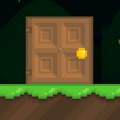 A Door placed on the top of a Dirt