Dragon Gate: Difference between revisions
From Growtopia Wiki
More actions
mNo edit summary |
No edit summary |
||
| Line 1: | Line 1: | ||
{{Item|Punch the door to open or shut it. Anyone unlucky enough to be caught inside when it closes becomes dragon food.|Fire}} | {{Item|Punch the door to open or shut it. Anyone unlucky enough to be caught inside when it closes becomes dragon food.|Fire}} | ||
{{RecipeSplice|Portcullis|Venus Guytrap}} | {{RecipeSplice|Portcullis|Venus Guytrap}} | ||
The '''Dragon Gate''' is a splicable toggleable foreground block which was added alongside the [[Fantasy Pack]]. | The '''Dragon Gate''' is a splicable [[Toggleable Foreground Block (block category)|toggleable foreground block]] which was added alongside the [[Fantasy Pack]]. | ||
==Function== | ==Function== | ||
Being a [[Toggleable Foreground Block (block category)|toggleable foreground block]], a Dragon Gate works like a [[Fissure]], allowing | Being a [[Toggleable Foreground Block (block category)|toggleable foreground block]], a Dragon Gate works like a [[Fissure]], allowing eligible players to open and close the Dragon Gate by [[Punching|punching]] it. When toggled on, the item acts as a solid block which players cannot pass while killing all players trapped inside it. When toggled off, it opens and acts as a non-solid block which players can walk through. It can be wrenched to be made public or not. | ||
==Gallery== | ==Gallery== | ||
| Line 10: | Line 10: | ||
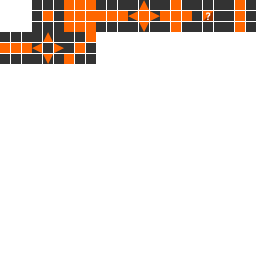
Dragon Gate Sprites.png|The textures of Dragon Gate | Dragon Gate Sprites.png|The textures of Dragon Gate | ||
</gallery> | </gallery> | ||
[[Category:Splicable]] | [[Category:Splicable]] | ||
[[Category:Wrenchable]] | [[Category:Wrenchable]] | ||
Revision as of 23:38, 10 January 2021
https://growtopiawiki.nbg1.your-objectstorage.com/uploads/8/8f/ItemSprites.png Dragon Gate (Rarity: 57)
Punch it to open or shut it. Anyone unlucky enough to be caught inside when it closes becomes dragon chow.
PropertiesThis item has special properties you can adjust with the Wrench.
Data| Type | https://growtopiawiki.nbg1.your-objectstorage.com/uploads/8/8f/ItemSprites.png Toggleable Block - Foreground |
|---|---|
| Chi | https://growtopiawiki.nbg1.your-objectstorage.com/uploads/8/8f/ItemSprites.png Fire |
| Texture Type | https://growtopiawiki.nbg1.your-objectstorage.com/uploads/5/54/TextureTypeSprite.png Single |
| Collision Type | https://growtopiawiki.nbg1.your-objectstorage.com/uploads/e/e2/CollisionTypeSprite.png No Collision if turned on |
| Hardness | https://growtopiawiki.nbg1.your-objectstorage.com/uploads/8/8f/ItemSprites.png 15 Hits https://growtopiawiki.nbg1.your-objectstorage.com/uploads/8/8f/ItemSprites.png 12 Hits Restores after 2s of inactivity. |
| Seed Color | https://growtopiawiki.nbg1.your-objectstorage.com/uploads/9/9c/SeedSprites.png #E4E4E4 #FF2727 |
| Grow Time | https://growtopiawiki.nbg1.your-objectstorage.com/uploads/e/e5/TreeSprites.png 2d 3h 55m 3s |
| Default Gems Drop | https://growtopiawiki.nbg1.your-objectstorage.com/uploads/8/8f/ItemSprites.png 0 - 15 |
https://growtopiawiki.nbg1.your-objectstorage.com/uploads/8/8f/ItemSprites.pnghttps://growtopiawiki.nbg1.your-objectstorage.com/uploads/8/8f/ItemSprites.png Red
https://growtopiawiki.nbg1.your-objectstorage.com/uploads/8/8f/ItemSprites.pnghttps://growtopiawiki.nbg1.your-objectstorage.com/uploads/8/8f/ItemSprites.png Yellow
https://growtopiawiki.nbg1.your-objectstorage.com/uploads/8/8f/ItemSprites.pnghttps://growtopiawiki.nbg1.your-objectstorage.com/uploads/8/8f/ItemSprites.png Green
https://growtopiawiki.nbg1.your-objectstorage.com/uploads/8/8f/ItemSprites.pnghttps://growtopiawiki.nbg1.your-objectstorage.com/uploads/8/8f/ItemSprites.png Aqua
https://growtopiawiki.nbg1.your-objectstorage.com/uploads/8/8f/ItemSprites.pnghttps://growtopiawiki.nbg1.your-objectstorage.com/uploads/8/8f/ItemSprites.png Blue

| https://growtopiawiki.nbg1.your-objectstorage.com/uploads/e/e5/TreeSprites.png Splicing |
|---|
| The tree of this item can be made by mixing the following seeds: |
| https://growtopiawiki.nbg1.your-objectstorage.com/uploads/9/9c/SeedSprites.png Portcullis Seed https://growtopiawiki.nbg1.your-objectstorage.com/uploads/9/9c/SeedSprites.png Venus Guytrap Seed |
The Dragon Gate is a splicable toggleable foreground block which was added alongside the Fantasy Pack.
Function
Being a toggleable foreground block, a Dragon Gate works like a Fissure, allowing eligible players to open and close the Dragon Gate by punching it. When toggled on, the item acts as a solid block which players cannot pass while killing all players trapped inside it. When toggled off, it opens and acts as a non-solid block which players can walk through. It can be wrenched to be made public or not.
Gallery
-
 The textures of Dragon Gate