Audio Rack: Difference between revisions
More actions
ExplodingLab (talk | contribs) No edit summary |
No edit summary |
||
| Line 31: | Line 31: | ||
*'-' - Natural | *'-' - Natural | ||
*'b' - Flat | *'b' - Flat | ||
==Gallery== | |||
<gallery> | |||
Audio Rack Dialog Small.png|Audio Rack's dialog box | |||
Audio Rack Dialog 1.png|The first half of Audio Rack's dialog box, with the instructions opened | |||
Audio Rack Dialog 2.png|The second half of Audio Rack's dialog box, with the instructions opened | |||
</gallery> | |||
[[Category:Cinco De Mayo Week]] | [[Category:Cinco De Mayo Week]] | ||
[[Category:Splicable]] | [[Category:Splicable]] | ||
Revision as of 14:12, 17 January 2022
https://cdn.growtopiawiki.com/uploads/8/8f/ItemSprites.png Audio Rack (Rarity: 87)
This item can only be used in World-Locked worlds.
| Type | https://cdn.growtopiawiki.com/uploads/8/8f/ItemSprites.png Audio Block - Foreground |
|---|---|
| Chi | https://cdn.growtopiawiki.com/uploads/8/8f/ItemSprites.png Wind |
| Texture Type | https://cdn.growtopiawiki.com/uploads/5/54/TextureTypeSprite.png Single |
| Collision Type | https://cdn.growtopiawiki.com/uploads/e/e2/CollisionTypeSprite.png No Collision |
| Hardness | https://cdn.growtopiawiki.com/uploads/8/8f/ItemSprites.png 5 Hits https://cdn.growtopiawiki.com/uploads/8/8f/ItemSprites.png 4 Hits Restores after 4s of inactivity. |
| Seed Color | https://cdn.growtopiawiki.com/uploads/9/9c/SeedSprites.png #393939 #A18182 |
| Grow Time | https://cdn.growtopiawiki.com/uploads/e/e5/TreeSprites.png 1w 0d 15h 38m 33s |
| Default Gems Drop | https://cdn.growtopiawiki.com/uploads/8/8f/ItemSprites.png 0 - 22 |

| https://cdn.growtopiawiki.com/uploads/e/e5/TreeSprites.png Splicing |
|---|
| The tree of this item can be made by mixing the following seeds: |
| https://cdn.growtopiawiki.com/uploads/9/9c/SeedSprites.png Military Radio Seed https://cdn.growtopiawiki.com/uploads/9/9c/SeedSprites.png Steam Crossover Seed |
| https://cdn.growtopiawiki.com/uploads/8/8f/ItemSprites.png Provider |
|---|
| Drops in sets of 1 from harvesting a/an: https://cdn.growtopiawiki.com/uploads/8/8f/ItemSprites.png Building Blocks Machine (random chance) |
The Audio Rack is a splicable non-solid block introduced during Cinco De Mayo Week 2017.
Function
When placed, Audio Rack allows players to adjust music in a world such as the volume and allows up to five notes to be played simultaneously.
They can also be used to play notes that are usually unplayable, such as overlapping notes or notes blocked by Bedrock. They can only play Piano, Drums, Bass, Sax, Flute, Lyre, Violin, Spanish Guitar, Electric Guitar and Mexican Trumpet notes and sheets such as Sheet Music: Spooky and Sheet Music: Winterfest cannot be played.
The volume can also be adjusted, however, the sound can only be softened. The maximum volume is 100 which is the same as regular sheet music. It can be reduced by changing the value to less than 100.
A single Audio Rack can play up to 5 notes at once. Notes can be added by entering a series of musical notes into the text box after interacting with the block with a wrench. Each "music note" entered into the Audio Rack has three parts, the instrument, the note, and the accidental, entered in that order. The note is any letter A through G, with lowercase being the lower octave and upper case being the higher octave. The options for accidentals and instrument names are listed below.
The letter for each playable instrument:
- 'P' - Piano
- 'B' - Bass
- 'S' - Sax
- 'F' - Flute
- 'G' - Guitar
- 'V' - Violin
- 'L' - Lyre
- 'E' - Electric Guitar
- 'T' - Mexican Trumpet
- 'D' - Drums
The letter for each accidental:
- '#' - Sharp
- '-' - Natural
- 'b' - Flat
Gallery
-
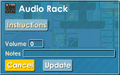 Audio Rack's dialog box
 -
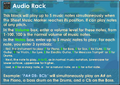 The first half of Audio Rack's dialog box, with the instructions opened
 -
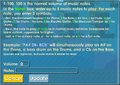 The second half of Audio Rack's dialog box, with the instructions opened