Operating Table: Difference between revisions
More actions
No edit summary |
No edit summary |
||
| (11 intermediate revisions by 2 users not shown) | |||
| Line 1: | Line 1: | ||
{{Item|Lay on this Operating Table and one of our doctors will see to you as soon as possible. The Reception Desk will send Surg-E patients to these Operating Tables on a regular basis, failure to cure the Surg-E Patient in time will result in a failed surgery and the hospital's rating being reduced as a result.|Earth}} | {{Item|Lay on this Operating Table and one of our doctors will see to you as soon as possible. The Reception Desk will send Surg-E patients to these Operating Tables on a regular basis, failure to cure the Surg-E Patient in time will result in a failed surgery and the hospital's rating being reduced as a result.|Earth}} | ||
{{SurgHospUp| | {{SurgHospUp|2-7|9-10|12-13|15|18|20|23|25|29|33|37|42|48}} | ||
The '''Operating Table''' is an unsplicable non-solid foreground block which was added as a part of [[Player Appreciation Week/2024|Player Appreciation Week 2024 Day 1]] on August 26, 2024. | The '''Operating Table''' is an unsplicable non-solid foreground block which was added as a part of [[Player Appreciation Week/2024|Player Appreciation Week 2024 Day 1]] on August 26, 2024. | ||
==Function== | |||
Being a [[Bed (block category)|bed]], executing the /sleep [[Chat|command]] in chat while standing on the same tile as a Hospital Bed will cause the player to sleep in it. | |||
A Hospital Bed is different from other beds in the sense that a player can [[Surgery Guide|perform a surgery]] on another player who is standing on the same tile as this block. | |||
If the Operating Table is in a hospital, a [[File:Surg-Bot.png|30px|link=]] Surg-bot will spawn on the Operating Table daily that functions similarly to a [[Surg-E]]. Players are required to cure the spawned Surg-bot in the patient duration time interval, which is shown in the "''Level up Hospital''" menu when the player [[Wrench|wrenchs]] the [[Reception Desk]]. Failure to cure the Surg-bot within the patient duration is counted as an unsuccessful surgery, increasing failed surgery count and decreasing the hospital's ratings. The patient's duration increases as the hospital level increases. | |||
The number of Operating Tables to be placed in every hospital world is limited. This limitation decreases as the player levels the hospital up. | |||
==Gallery== | |||
<gallery> | |||
Operating Table.png|Surg-E Patient Duration | |||
</gallery> | |||
[[Category:Unsplicable]] | [[Category:Unsplicable]] | ||
[[Category:Player Appreciation Week]] | [[Category:Player Appreciation Week]] | ||
Latest revision as of 14:22, 10 November 2024
This item never drops any seeds.
| Type | https://growtopiawiki.nbg1.your-objectstorage.com/uploads/8/8f/ItemSprites.png Foreground Block - Foreground |
|---|---|
| Chi | https://growtopiawiki.nbg1.your-objectstorage.com/uploads/8/8f/ItemSprites.png Earth |
| Texture Type | https://growtopiawiki.nbg1.your-objectstorage.com/uploads/5/54/TextureTypeSprite.png Single |
| Collision Type | https://growtopiawiki.nbg1.your-objectstorage.com/uploads/e/e2/CollisionTypeSprite.png No Collision |
| Hardness | https://growtopiawiki.nbg1.your-objectstorage.com/uploads/8/8f/ItemSprites.png 10 Hits https://growtopiawiki.nbg1.your-objectstorage.com/uploads/8/8f/ItemSprites.png 8 Hits Restores after 5s of inactivity. |
| Seed Color | https://growtopiawiki.nbg1.your-objectstorage.com/uploads/9/9c/SeedSprites.png #7BD7AA #92A1B9 |
| Grow Time | https://growtopiawiki.nbg1.your-objectstorage.com/uploads/e/e5/TreeSprites.png 1h 0m 0s |
| Default Gems Drop | https://growtopiawiki.nbg1.your-objectstorage.com/uploads/8/8f/ItemSprites.png N/A |

| https://growtopiawiki.nbg1.your-objectstorage.com/uploads/8/8f/ItemSprites.png Upgrading Your Hospital Level |
|---|
| Obtained as a prize from upgrading your Hospital world to levels 2-7, 9-10, 12-13, 15, 18, 20, 23, 25, 29, 33, 37, 42, 48. |
The Operating Table is an unsplicable non-solid foreground block which was added as a part of Player Appreciation Week 2024 Day 1 on August 26, 2024.
Function
Being a bed, executing the /sleep command in chat while standing on the same tile as a Hospital Bed will cause the player to sleep in it.
A Hospital Bed is different from other beds in the sense that a player can perform a surgery on another player who is standing on the same tile as this block.
If the Operating Table is in a hospital, a  Surg-bot will spawn on the Operating Table daily that functions similarly to a Surg-E. Players are required to cure the spawned Surg-bot in the patient duration time interval, which is shown in the "Level up Hospital" menu when the player wrenchs the Reception Desk. Failure to cure the Surg-bot within the patient duration is counted as an unsuccessful surgery, increasing failed surgery count and decreasing the hospital's ratings. The patient's duration increases as the hospital level increases.
The number of Operating Tables to be placed in every hospital world is limited. This limitation decreases as the player levels the hospital up.
Gallery
-
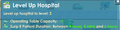 Surg-E Patient Duration