Death Metal Radio: Difference between revisions
From Growtopia Wiki
More actions
Fan6don662 (talk | contribs) Adding categories |
No edit summary |
||
| (7 intermediate revisions by 5 users not shown) | |||
| Line 1: | Line 1: | ||
{{Item | {{Item|Head bang to the extreme - and maybe a bit of dizziness - with this deadly radio. Crank it up to 11 and trash your way into any party.|Fire}} | ||
[[ | {{RecipeCombine|Death Metal Block|1|Military Radio|1|Sheet Music: Spooky|10}} | ||
The '''Death Metal Radio''' is a unsplicable toggleable animated foreground block which was introduced during [[Halloween Week/2017|Halloween Week 2017]]. | |||
==Function== | |||
[[File:Death_metal_radio.ogg|thumb|center|The Death Metal Radio's music.]] | |||
Being a [[Toggleable Animated Foreground Block (block category)|toggleable animated foreground block]], a Death Metal Radio can be toggled on or off via [[Punching|punching]]. When toggled on, a Death Metal Radio will change its appearance, showing a 2-frame animation, and play a piece of music. | |||
==Trivia== | |||
*In the game files, the Death Metal Radio's music is named death_metal_radio. | |||
==Gallery== | |||
<gallery> | |||
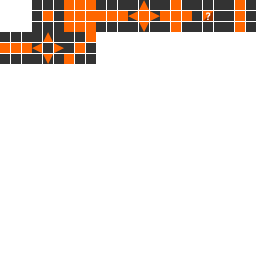
DMR Textures.png|The textures of Death Metal Radio | |||
</gallery> | |||
[[Category:Halloween]] | [[Category:Halloween]] | ||
[[Category:Music Blocks]] | [[Category:Music Blocks]] | ||
[[Category:Unsplicable]] | [[Category:Unsplicable]] | ||
[[Category: | [[Category:Toggleable Foreground Blocks]] | ||
Latest revision as of 20:31, 13 March 2023
Head bang to the extreme - and maybe a bit of dizziness - with this deadly radio. Crank it up to 11 and thrash your way into any party!
PropertiesThis item can be placed in two directions, depending on the direction you're facing.
This item never drops any seeds.
This item has special properties you can adjust with the Wrench.
DataThis item never drops any seeds.
This item has special properties you can adjust with the Wrench.
| Type | https://growtopiawiki.nbg1.your-objectstorage.com/uploads/8/8f/ItemSprites.png Toggleable Animated Block - Foreground |
|---|---|
| Chi | https://growtopiawiki.nbg1.your-objectstorage.com/uploads/8/8f/ItemSprites.png Fire |
| Texture Type | https://growtopiawiki.nbg1.your-objectstorage.com/uploads/5/54/TextureTypeSprite.png Single |
| Collision Type | https://growtopiawiki.nbg1.your-objectstorage.com/uploads/e/e2/CollisionTypeSprite.png No Collision |
| Hardness | https://growtopiawiki.nbg1.your-objectstorage.com/uploads/8/8f/ItemSprites.png 4 Hits https://growtopiawiki.nbg1.your-objectstorage.com/uploads/8/8f/ItemSprites.png 3 Hits Restores after 8s of inactivity. |
| Seed Color | https://growtopiawiki.nbg1.your-objectstorage.com/uploads/9/9c/SeedSprites.png #402D4D #B70E0E |
| Grow Time | https://growtopiawiki.nbg1.your-objectstorage.com/uploads/e/e5/TreeSprites.png 1h 0m 0s |
| Default Gems Drop | https://growtopiawiki.nbg1.your-objectstorage.com/uploads/8/8f/ItemSprites.png N/A |
https://growtopiawiki.nbg1.your-objectstorage.com/uploads/8/8f/ItemSprites.pnghttps://growtopiawiki.nbg1.your-objectstorage.com/uploads/8/8f/ItemSprites.png Red
https://growtopiawiki.nbg1.your-objectstorage.com/uploads/8/8f/ItemSprites.pnghttps://growtopiawiki.nbg1.your-objectstorage.com/uploads/8/8f/ItemSprites.png Yellow
https://growtopiawiki.nbg1.your-objectstorage.com/uploads/8/8f/ItemSprites.pnghttps://growtopiawiki.nbg1.your-objectstorage.com/uploads/8/8f/ItemSprites.png Green
https://growtopiawiki.nbg1.your-objectstorage.com/uploads/8/8f/ItemSprites.pnghttps://growtopiawiki.nbg1.your-objectstorage.com/uploads/8/8f/ItemSprites.png Aqua
https://growtopiawiki.nbg1.your-objectstorage.com/uploads/8/8f/ItemSprites.pnghttps://growtopiawiki.nbg1.your-objectstorage.com/uploads/8/8f/ItemSprites.png Blue

The Death Metal Radio is a unsplicable toggleable animated foreground block which was introduced during Halloween Week 2017.
Function
Being a toggleable animated foreground block, a Death Metal Radio can be toggled on or off via punching. When toggled on, a Death Metal Radio will change its appearance, showing a 2-frame animation, and play a piece of music.
Trivia
- In the game files, the Death Metal Radio's music is named death_metal_radio.
Gallery
-
 The textures of Death Metal Radio